
Manufacturing Automation Software for Factories
Stop people copying numbers from machines to paper to Excel. Capture counts and status where machines allow it, raise alerts on rules, and send the daily report without anyone compiling it.
What is Manufacturing Automation software?
Manufacturing automation software removes manual data entry and manual decisions from routine factory work — collecting counts and status from machines, raising work orders and alerts on rules, and moving information between planning, production, quality and stores without someone re-typing it.
Most Indian SMEs don't need robots to start automating. They need to stop the hours spent moving information by hand: a supervisor writing machine counts on a sheet, a clerk typing the sheet into Excel the next morning, and the owner reading a report about yesterday. Every copy adds a delay and a chance of error, and problems are found long after they could have been fixed.
Manufacturing automation software starts with that paperwork. Where a machine can give a signal — a count, a run/stop status, a temperature — we capture it directly. Where it can't, a quick entry on a tablet replaces the paper sheet. Rules then do the routine work: an alert when a machine has stopped for ten minutes, an inspection raised every 500 parts, a shift report sent at 6 am. We automate one process at a time and keep the ones that pay back, rather than wiring the whole factory at once.
Connects with
Built for manufacturers in
- Engineering & job shops
- Auto components
- Sheet metal & fabrication
- Plastics & moulding
- Food & beverage
- Pharma & chemicals
- Packaging & printing
- Textiles & garments
- Electronics & electricals
- Furniture & wood
Reports & dashboards
- Live machine status
- Plan vs actual by hour
- Alerts and response time
- Manual entries removed
What automation has to handle in an Indian SME
Old machines without PLCs
Many machines can still give a cycle or run signal through a simple add-on sensor. Where even that isn't practical, a two-tap operator entry fills the gap.
Mixed brands and ages
Machines from different makers and decades on one live status board, using whatever each one can provide.
The owner's daily report
The numbers the owner asks for every morning — output, rejection, stopped machines, dispatch — generated and sent automatically.
Alerts people act on
A few alerts that matter, sent to the person who can act, with escalation if nobody responds. Too many alerts and everyone ignores them.
No big IT team
The system is set up so a supervisor can add a machine, change a target or edit an alert rule without calling a programmer.
Start with one line
Prove the benefit on one line or process with a small budget, then extend line by line.
Problems Manufacturing Automation software solves
People copying numbers
Supervisors write counts from machines onto paper, and someone types them into Excel the next morning.
Problems found too late
A machine stops or a parameter drifts, and nobody knows until the shift report.
Systems that don't talk
Planning, stores, quality and accounts each keep their own copy of the same data.
Manufacturing Automation software features
Pick the features you need — everything is configured to your process.
Machine data capture
Counts, run/stop status and parameters from PLCs, controllers or add-on sensors where the machine allows (hardware is extra).
Rule-based alerts
Alerts when a machine stops, a count falls behind plan or a reading goes out of limit.
Automatic records
Production bookings, downtime entries and inspection triggers created from machine signals.
System integration
Data moved between your ERP, MES, spreadsheets and other tools through APIs or file exchange where they allow it.
Scheduled reports
Shift, daily and weekly reports generated and sent without anyone compiling them.
Step-by-step rollout
Start with one line or one process, prove the benefit, then extend.
Web app for the office
For owners, planners and managers — from any browser.
- Live status of every connected machine
- Hour-by-hour plan vs actual for each line
- Alerts raised, who responded and how fast
- Daily and weekly reports sent on a schedule
On the floor
A floor screen and a few quick entries where machines can't report.
- TV board showing running, stopped and idle machines
- Two-tap stop reason when a machine stops
- Counts entered by hour where a machine has no signal
- Alerts to the supervisor's phone or screen
How an automation project runs
List the copying
We map every place a number is written down, copied or re-typed, and estimate the time and errors each one causes.
Survey the machines
Machine by machine, what signal is available — PLC, controller output, or an add-on sensor — and what it would cost.
Automate one process
Usually the shift production report or machine status on one line, chosen because it is visible and measurable.
Set the rules
Alerts, targets and escalations agreed with the people who will receive them, and tuned in the first weeks so they stay useful.
Measure what changed
Hours of manual entry removed, response time to stops and report delay, compared with before.
Extend
More machines, more lines, or the next process — inspection triggers, material calls, maintenance requests — on the same system.
Manufacturing Automation software — FAQs
Do we need new machines to automate?
Usually not. Many machines already expose counts or status through their controller, and older ones can often be fitted with simple sensors. We review your machines first and tell you what can be connected and what it would involve.
What should we automate first?
The task that is done most often by the most people with the least judgement — usually recording production counts and machine stops. It is cheap to automate, visible to everyone and gives data for everything that follows.
Will our machine makers let you connect?
It depends on the machine. Some controllers have open outputs, some need the maker's option, and some can only be read through an add-on sensor. We check each machine before you commit, and say clearly where operator entry is the practical answer.
Does automation mean fewer jobs?
In SMEs it usually means supervisors and clerks stop copying numbers and spend that time on the floor fixing problems. The aim is faster information, not removing people.
Can it connect to our ERP?
Where your ERP allows import or offers an API, data can be passed to it. We check what your system supports during scoping and confirm before you commit.
Integrations depend on the third-party provider offering an API, SDK or data export, and are confirmed during scoping. Any third-party licences, API or usage fees, subscriptions (e.g. WhatsApp Business API, SMS, maps, cloud hosting) and hardware are billed by the provider and borne by the client.
Factory automation software we've delivered
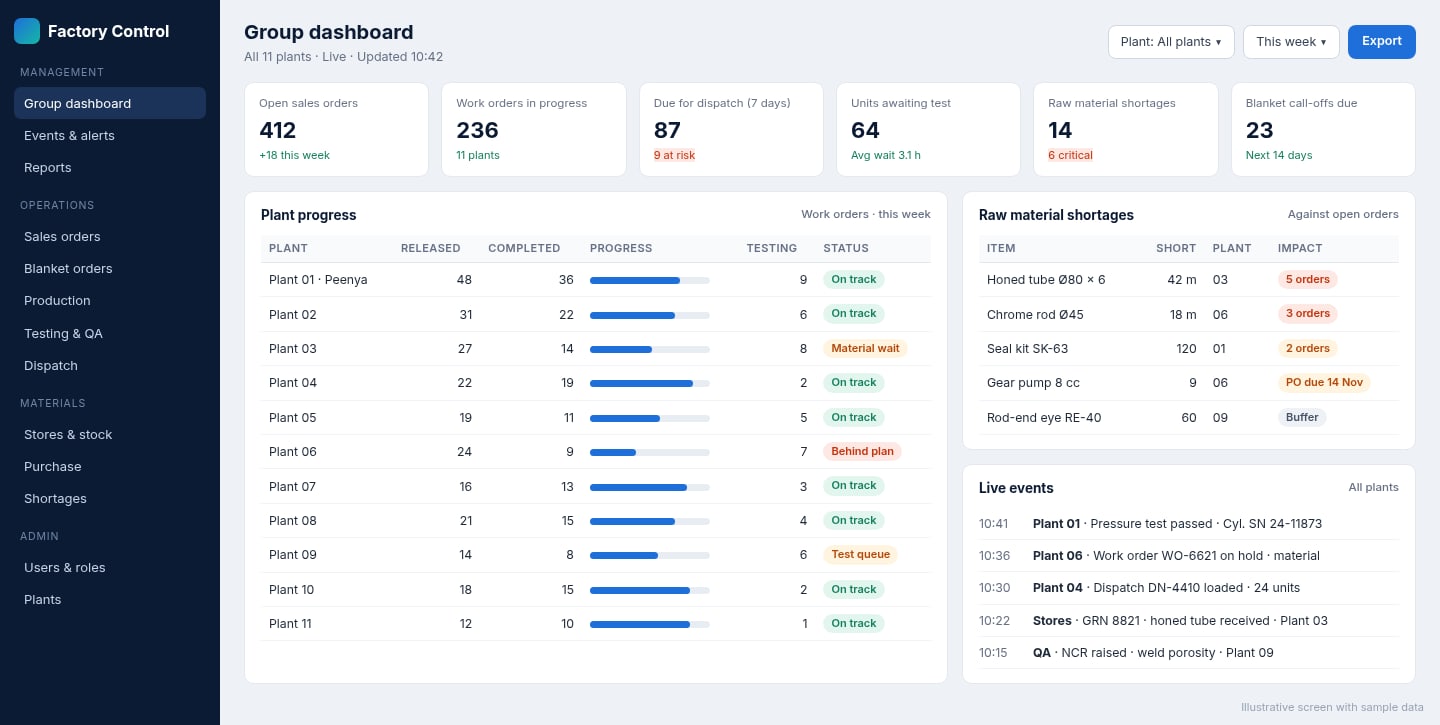
Cloud Factory Automation Software for a Hydraulic Equipment Manufacturer with 11 Factories
Old VB software usable only inside one facility, replaced with cloud software and a keyboard-driven desktop app used across all 11 factories.
Read the use case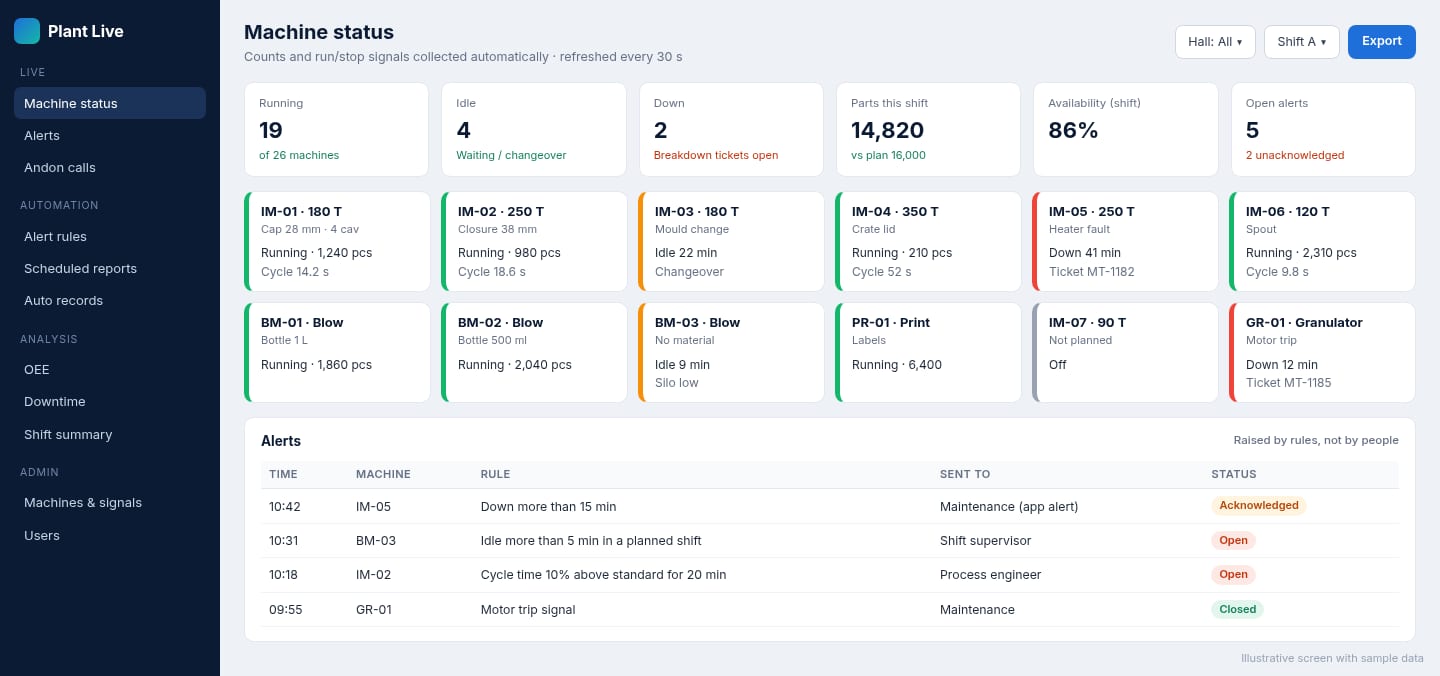
Factory Automation Software for a Plastics Moulding Manufacturer
Machine status checked by walking the floor and reports typed up by hand, replaced with live machine signals, rule-based alerts and automatic reports.
Read the use caseFactory automation guides for manufacturers
Practical articles on planning, choosing and running manufacturing automation software, written for small and mid-sized factories.
Manufacturing Automation Software: What Small Factories Should Automate First
A practical guide to manufacturing automation software for SME factories — the difference between physical and information automation, the first five…
Automation as the Glue Between Factory Systems: Events, Rules and Hand-offs
How manufacturing automation connects ERP, MES, quality, maintenance and inventory: events that trigger actions in other systems, rules that replace…
The Owner's Daily Factory Report: What to Include and How to Automate It
What a factory owner's daily report should contain — output, rejections, stoppages, dispatch, orders, cash — where each number comes from, and how to…
Manufacturing Workflow Software: How to Stop Jobs Waiting Between Departments
What manufacturing workflow software is, where factory jobs actually lose time, how to model release, inspection, approval, rework and dispatch…
Approval Workflow Automation: Replacing Email and WhatsApp Approvals With a Clear Process
How businesses automate approvals for purchases, quotes, discounts, expenses, leave and documents — defining approval rules and limits, routing…
An Industry 4.0 Roadmap for Small Manufacturers: Practical Steps from Paper to Connected Factory
A staged, realistic Industry 4.0 roadmap for SMEs — digitising data capture, visibility, connected machines, integration, analytics and automation …
Retrofitting Old Machines for IIoT: Getting Data from Legacy Equipment Without Replacing It
How to collect run/stop status, counts, cycle times and condition data from older machines using sensors, PLC connections and gateways — what data is…
What Is OEE and How Do You Calculate It? A Practical Guide for Factories
OEE explained simply: availability, performance and quality, how to calculate OEE with a worked example, the six big losses, and how software tracks…
The Six Big Losses in Manufacturing: How to Find and Eliminate Them on Your Shop Floor
A practical guide to the six big losses — breakdowns, setups, small stops, reduced speed, start-up rejects and production rejects — how each affects…
Andon Systems for Manufacturing: Calling for Help, Responding Fast and Learning from Every Stop
How digital andon systems work — operator calls for maintenance, quality, material and supervisors; escalation rules; response timing; andon boards…
Downtime Reason Codes: How to Design Them So Your Data Is Actually Useful
How to design machine downtime reason codes — categories, levels, naming, planned vs unplanned, micro-stops and review — so operators pick the right…
Factory Energy Monitoring: Measuring Electricity, Air and Utilities to Cut Energy Cost per Part
How manufacturers monitor energy by machine, line and utility — electricity, compressed air, steam, water and fuel — calculate energy per unit, find…
Manufacturing KPIs for Factory Managers: The Measures That Matter and How to Use Them
The essential manufacturing KPIs — safety, quality, delivery, cost and people — including OEE, first pass yield, on-time delivery, schedule…
Related manufacturing software
Machine Monitoring
Real-time machine and production monitoring
IoT Manufacturing Platform
Connects machines and sensors
OEE Software
Measures machine effectiveness
Downtime Management
Records machine downtime and reasons
Manufacturing Workflow Software
Digital hand-offs, approvals and escalations between steps
Energy Management
Tracks factory energy consumption
Need Manufacturing Automation software for your factory?
Tell us how it works today. We'll suggest the right features, show a prototype and give you a fixed quote.
- Free consultation
- Prototype before you commit
- Fixed, itemised quote
- You own the software