The client
The client is a well-established manufacturer of hydraulic equipment headquartered in the Peenya Industrial Area in Bengaluru, one of India's largest engineering and fabrication clusters. Its products — hydraulic cylinders, power packs and related assemblies — go to equipment makers and industrial customers, many of whom place repeat business through long-running blanket orders. Over the years the company has grown to 11 factories. At the client's request we do not publish its name.
The challenge: a capable old system that couldn't leave the building
For many years the business ran on an in-house application built in Visual Basic. It did its job, and the staff knew it well, especially its keyboard shortcuts for fast data entry. But it had become a limit on how the company could grow:
- It worked only inside the facility. The application ran on the local network, so the founders and managers could not see orders, production or stock when they were at another plant, at a customer or travelling.
- Eleven factories, no single picture. Information from different plants had to be collected by phone, email and spreadsheets before anyone could see the whole business.
- Manual tracking everywhere. Order status, material availability, test results and dispatch readiness were followed up by calling people and checking registers.
- Hard to change and slow to run. Years of additions had made the old code heavy, and adding new processes or controls was difficult.
- Limited access control. The old system had few ways to control who could see or change what, which mattered more as more people and plants used it.
What the founders asked for
The founders were clear about what they wanted:
- A cloud-hosted system that every factory, and the management team, could use from anywhere.
- A desktop application that felt like the VB system their teams were used to — fast, keyboard-driven, with shortcut keys — so that daily work would not slow down after the change.
- One system covering the full flow from order to delivery, including the processes specific to a hydraulics business: blanket orders, testing and QA.
- More roles and permissions, so each person sees and does only what their job requires.
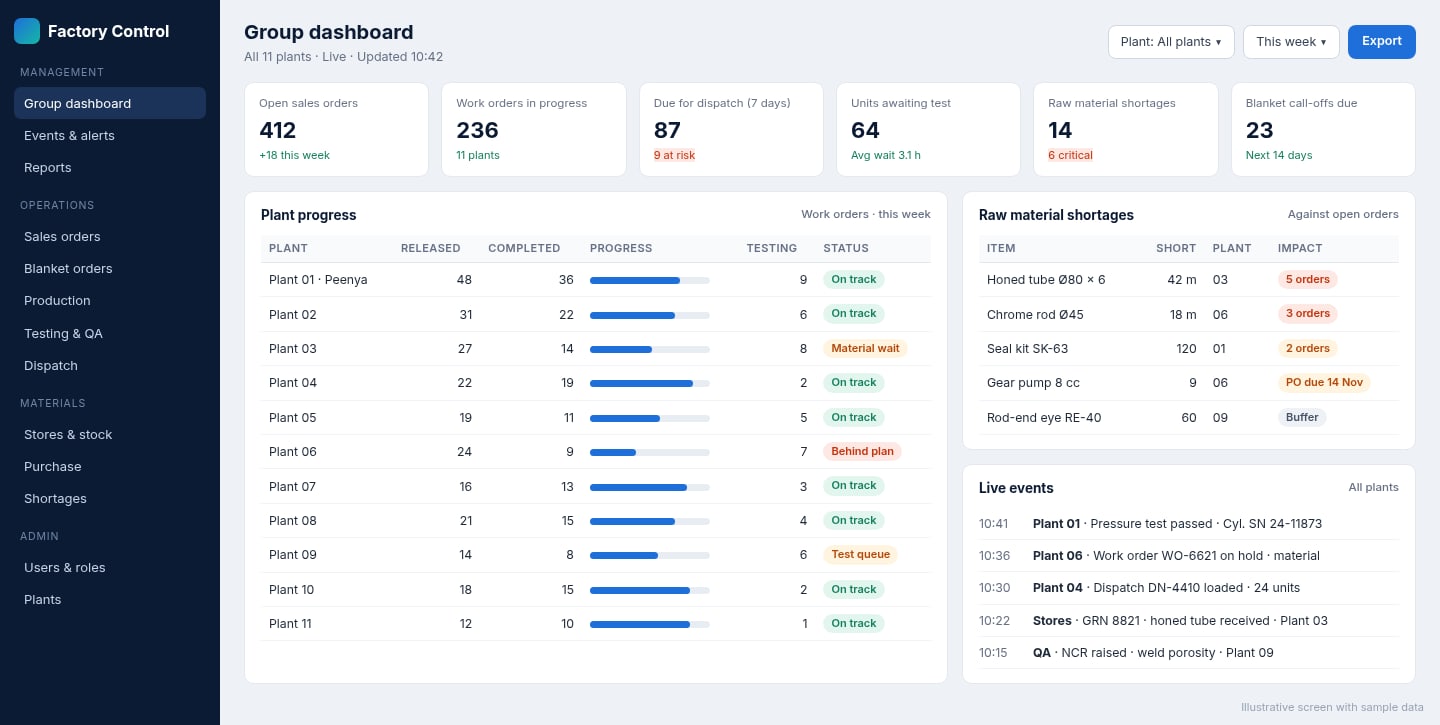
- A single dashboard for management to follow events, work, progress and raw material shortages across all plants.
What Corposol built
We designed and built a cloud-hosted factory automation system with two ways in: a web application for management and office users, and a Windows desktop application for high-volume daily entry. Both work on the same central database, so a test result recorded at one plant appears on the management dashboard straight away.
Modules delivered
- Order management — enquiries, sales orders and order lines with drawing revision, test plan and delivery instructions, linked to production and dispatch.
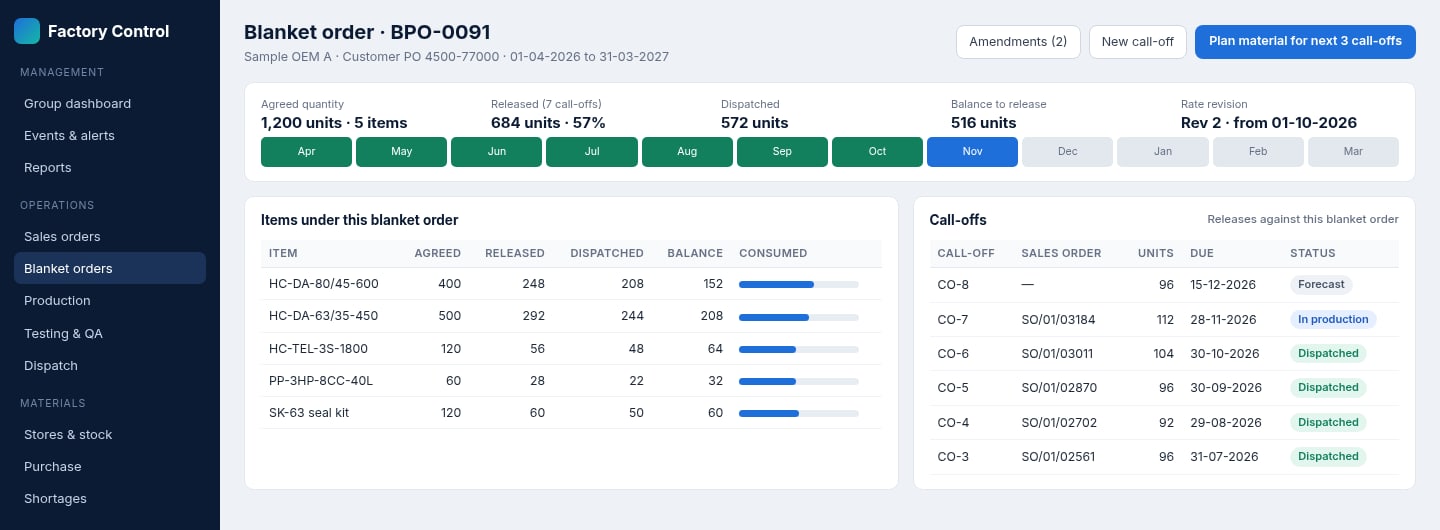
- Blanket order management — long-term customer agreements with agreed quantities, rate revisions and call-offs, showing released, dispatched and balance quantities for each item.
- Material management — material requirements for each order, availability checks before release, and shortage tracking against the orders they affect.
- Storage and stores management — goods receipt, stock by plant and location, issue to work orders and transfers between plants.
- Production tracking — work orders released per plant with progress visible to planners and management.
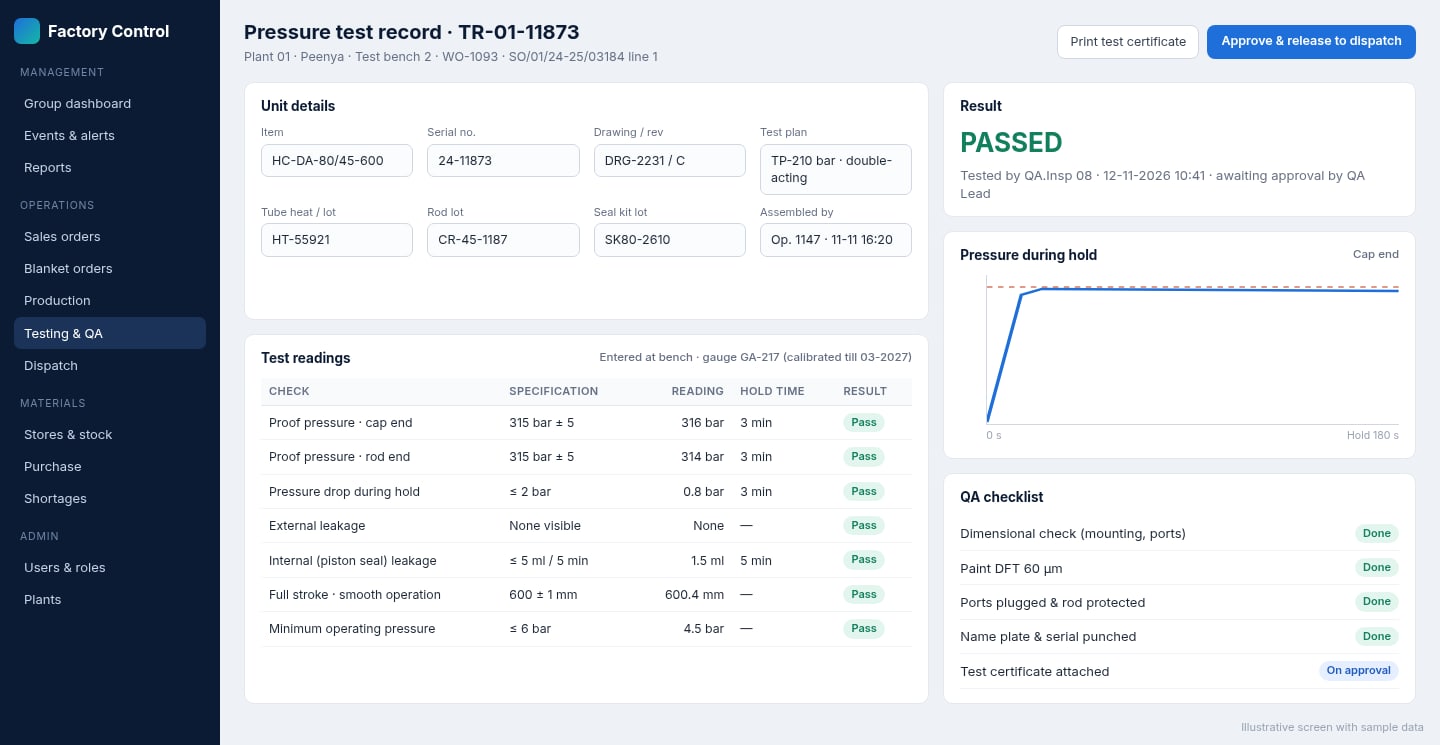
- Testing — test records for each unit by serial number, such as proof pressure, hold-time pressure drop, leakage and stroke checks, against the test plan for that product.
- QA process — inspection checklists, approvals and release to dispatch only after QA sign-off, with records linked to the order and serial number.
- Delivery and dispatch — dispatch planning, documents and status through to delivery.
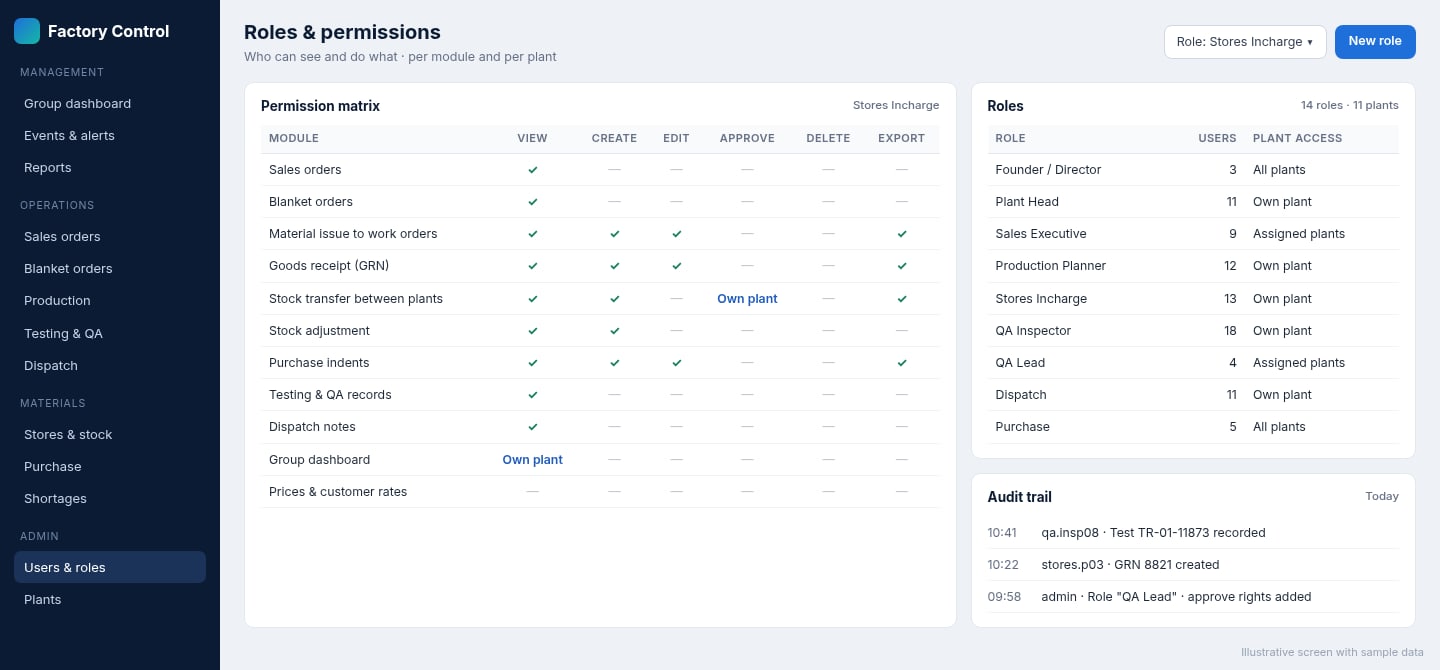
- Roles, permissions and audit trail — permissions by module, action and plant, with a record of who did what and when.
- Management dashboard — one live view of events, work, progress and raw material shortages across all plants.
A desktop app that feels familiar
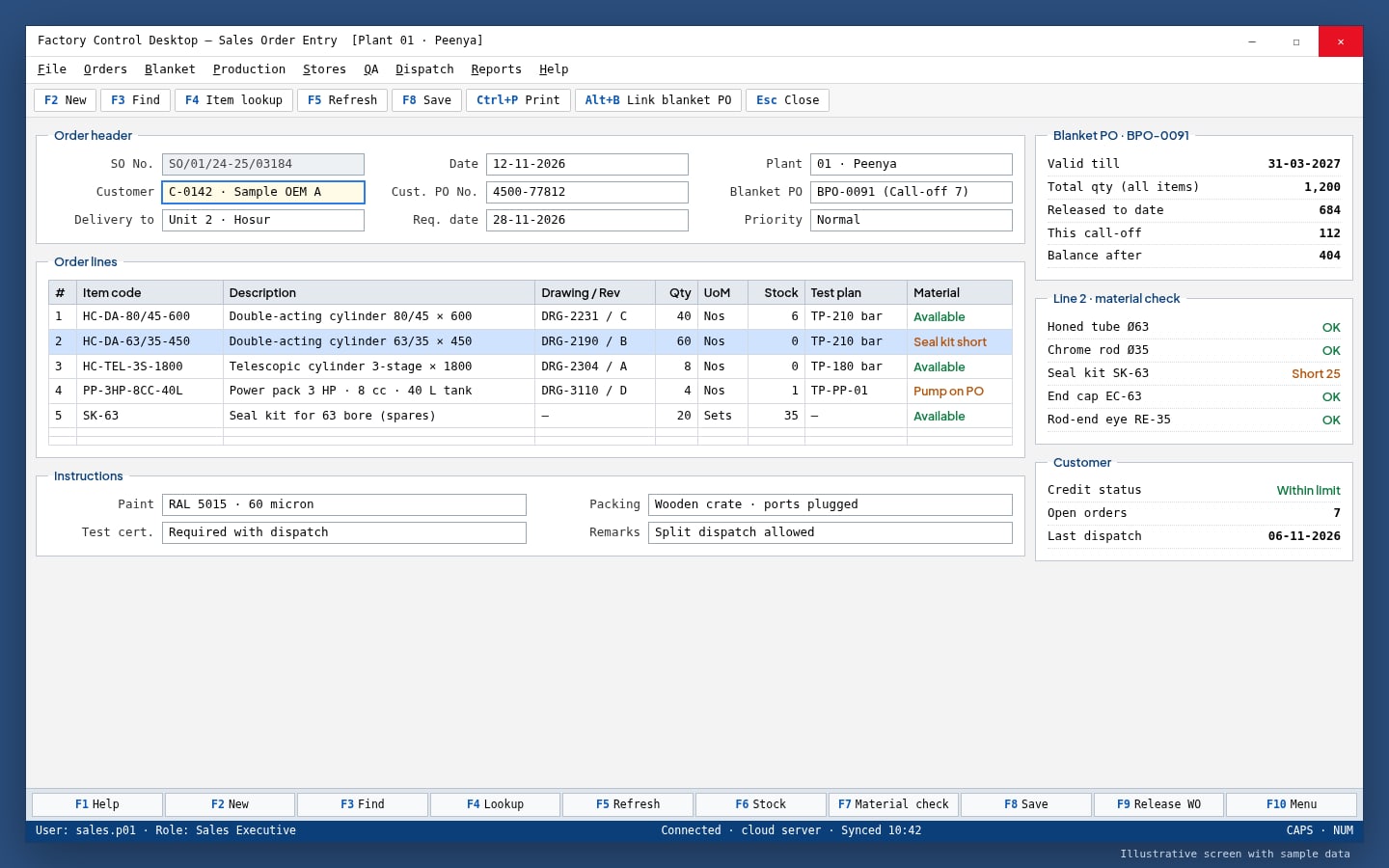
Changing systems is hardest for the people who enter data all day. To keep them productive, the desktop app follows the working style of the old VB application: dense entry screens, quick lookups and function-key and keyboard shortcuts for common actions such as new, find, item lookup, material check and save. Experienced users can work without touching the mouse, while the data goes straight to the cloud system that every plant shares.
Blanket orders, from agreement to call-off
Much of the client's business comes through blanket orders: a customer agrees quantities for a period, then releases call-offs month by month. The system holds each agreement with its items, quantities, validity and rate revisions, and links every call-off to the sales order that fulfils it. Sales, planning and management can see at a glance how much has been released, dispatched and is still open, and plan material for upcoming call-offs.
Testing and QA built into the flow
Every hydraulic unit has to be tested before it leaves the factory. The testing module records readings against the test plan for each serial number, links them to the material lots used, and keeps the QA checklist with the record. Units move to dispatch only after QA approval, and test certificates can be produced from the same data.
Roles and permissions for 11 plants
With many more people now using the system across 11 factories, access control was essential. Roles define what each person can view, create, edit, approve, delete or export in each module, and which plants they can see. Sensitive information such as customer rates can be hidden from roles that don't need it, and an audit trail records important actions.
The results
The software was delivered in full, to the client's satisfaction, and is used across all of its factories. The main improvements the client sees in day-to-day work:
- Far less manual tracking. Order status, material shortages, test results and dispatch readiness are visible in the system, so far fewer phone calls, registers and spreadsheets are needed to find out where things stand.
- Access from anywhere. The founders and managers can follow every plant from the office, another factory or on the move, instead of only from inside one facility.
- Faster, lighter software. The new system was written with lean, efficient code, so screens and reports respond quickly — including for users working in the desktop app all day.
- The right access for each person. More roles and finer permissions mean each user sees and changes only what their job requires, across 11 plants.
- One dashboard for management. Events, work in progress, production progress and raw material shortages for every plant are on a single screen, so problems are seen while there is still time to act.
- No loss of speed for experienced users. Keeping familiar shortcut keys in the desktop app meant teams could keep working at the pace they were used to.
Why it worked
Three choices made the difference. First, we treated the old VB system as a source of knowledge rather than something to throw away: the way people worked in it shaped the new desktop app. Second, we built one cloud database for all plants instead of separate systems that would need to be stitched together later. Third, we built the hydraulics-specific processes — blanket orders, unit testing and QA release — into the core flow, rather than leaving them in side registers.
Have a similar system to replace?
Many manufacturers still depend on an old in-house application written in VB, Access or FoxPro that works well but can't be used outside one building or one plant. Corposol builds custom manufacturing software — MES, workflow, inventory, quality and factory automation — as cloud systems with desktop and mobile apps where they help. All custom code is transferred to you on final payment.
Frequently asked questions
Can you replace an old VB6 or Access application without disrupting the factory?
Yes. We study the existing application with the people who use it, rebuild the workflows on a modern cloud system, and keep familiar screens and shortcut keys where they help. Each project's cut-over plan is agreed with the client so day-to-day work is not interrupted.
Why build a desktop app as well as a web app?
Teams that enter many orders, receipts and test records every day often work faster with a keyboard-driven desktop screen than with a browser. A desktop app connected to the same cloud database gives them that speed, while managers and other users can work in the browser.
Can one system run several factories?
Yes. Each plant keeps its own orders, stock, production and test records, and users see only the plants their role allows, while management sees all plants together on one dashboard.
Who owns the software?
The client. All custom code built for a project is transferred to the client on final payment.