An app-like mobile web experience — faster, lighter and personalised.
Progressive web apps, or PWAs as they are popularly known, are one of the biggest talking points in the tech industry. Everyone wants to know more about this technology.
Progressive web apps are web applications that load in the browser like regular web pages, but also have capabilities of an app — working offline, push notifications and access to device hardware — that were originally available only to native mobile applications.
How did progressive web apps come onto the scene?
A study by Google comparing 1,000 mobile apps with 1,000 mobile websites found that the mobile web had far higher reach (11.4 million unique visitors versus 4 million for apps), but time spent was higher in native apps. Businesses needed something with the reach of the mobile web and the engagement of a native app. Enter the progressive web app.
Characteristics of progressive web apps
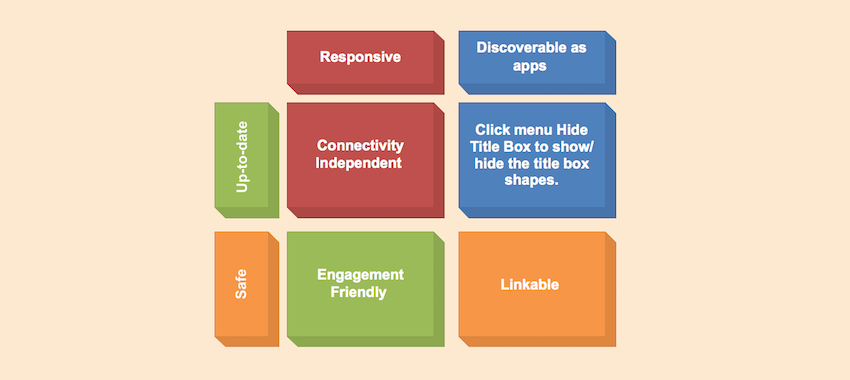
- Responsive: they fit any form factor — phone, tablet or desktop.
- Discoverable as apps: W3C web app manifests and service worker registration let search engines identify them as applications.
- Connectivity independent: service workers allow PWAs to work offline or on poor networks.
- Up-to-date: the service worker keeps content fresh.
- Safe: PWAs are served over HTTPS, preventing snooping and tampering.
- Engaging: push notifications keep users coming back.
- Installable: users can add them to the home screen without an app store.
- Linkable: share them with a simple URL.
How do you know a website is a PWA?
Google defines a baseline set of criteria:
Site is served over HTTPS
Security is a core characteristic, so HTTPS is the first requirement.
Pages are responsive on tablets and mobile devices
Pages must adapt to mobile and tablet screens.
All app URLs load when offline
A PWA should present meaningful content even in airplane mode.
Metadata provided for "Add to Home Screen"
A web app manifest lets users install the app on their home screen.
Fast first load
First load speed is a key quality indicator. Cross-browser compatibility, smooth page transitions and a unique URL per page complete the picture.
Developing your progressive web app
Google provides detailed guides for turning a website into a PWA, and its open-source Lighthouse tool audits PWA quality and can be plugged into continuous integration.
Brands such as BookMyShow, Pinterest and OLX saw major improvements in conversions and engagement after moving to PWAs. Progressive web apps are here to stay.
"The measure of intelligence is the ability to change." — Albert Einstein
Progressive web apps today
Since this article was first published, PWAs have matured. Modern browsers support installation to the home screen, offline caching, push notifications on most platforms and access to many device features. For business applications — dealer ordering, field data capture, customer portals — a PWA can deliver an app-like experience without app-store distribution.
When a PWA is the right choice
- Users are many and occasional — customers, dealers, building residents.
- You want one codebase for web and mobile.
- You need offline support for forms and data capture.
- You want to update instantly without app-store reviews.
When a native app is better
- Heavy daily use by field teams who need the smoothest performance.
- Deep device integration — Bluetooth printers, background location, advanced camera use.
- App-store presence is part of your marketing.
PWAs in field service and manufacturing
For field service and shop-floor apps, PWAs are a practical option for customer portals, QR-code request forms and shop-floor tablets, while technician apps often benefit from native or cross-platform builds. We help clients choose based on users and use cases rather than technology preference.
Getting started
If you're considering a PWA or mobile app, start by listing who will use it, how often, on which devices and with what connectivity. Those answers usually make the technology choice obvious. We're happy to help you think it through — talk to us.
PWA performance basics
A PWA's value depends on speed. Keep the initial load small, cache what users need offline, compress images and test on real mid-range phones over mobile data. A fast PWA feels like an app; a slow one feels like a website pretending to be one.
Security considerations
PWAs run over HTTPS by requirement, which protects data in transit. For business apps, add proper authentication, role-based access and careful handling of offline data on shared devices.
Examples of business PWAs
- A customer portal where residents of an apartment complex raise complaints and pay maintenance dues.
- A dealer ordering app for a distributor's retail network.
- A QR-code request form for occupants in a facility-managed building.
- A shop-floor booking screen on factory tablets.
Each benefits from easy access without app-store installs and from instant updates.
Frequently asked questions
Can a PWA work for field staff?
Yes, for many use cases: forms, checklists, photo capture and offline data entry work well in a PWA. For heavy daily use with Bluetooth printers or background location, a native or cross-platform app is usually the better choice.
Will a PWA help our website's SEO?
A PWA is still a website, so its pages can be indexed like any other. Speed, mobile usability and good content — which PWAs encourage — all support search visibility.
What is a progressive web app?
A website built to behave like an app: installable to the home screen, fast, able to work offline and, on most platforms, able to send notifications.
Are PWAs supported on iPhones?
Yes, modern iOS supports installing PWAs to the home screen, with some feature differences from Android; we test on both.
Is a PWA cheaper than a native app?
Usually, because one codebase serves web and mobile and there is no app-store release process. Native apps still win for heavy daily use and deep device features.
Corposol builds PWAs as part of our web application development services. Talk to us about making your web app installable and offline-ready.